Don't Panic!

Sam Vary's blog about programming and life in general.

Using Ember Simple Auth to Add Sessions to Your Ember App

I think my blog could do with a bit of focus for my next entry, so I decided to pick a more technical topic and hone in on something that was giving me trouble. I’ve found Ember to be very challenging, but what’s something more specific I’d like to understand better? Hmm, I thought to myself, I wonder how authentication usually goes down in Ember. That might be worth exploring.

The first thing I came across was a library called Ember Simple Auth, which allows you to do just what I wanted - implement a lightweight authentication system within your already existing Ember app.

“That’s cool” you say, “but how does it work?” Well, Skip, I’m glad you asked. There are 4 key building blocks that come with Ember Simple Auth, once you install the library. You can also go clone a repo that contains a dummy app for easy reference with all the needed functionality already built-out, which is pretty thoughtful, and the dummy app includes an example for Facebook integration as well.

So the building blocks roll out thusly: the session itself, a session store, authenticators, and authorizers.

“What do those things do?” you ask, staring at me wide-eyed.

Pretty simple, the session is as we generally understand it and is the main interface to the library. The session in the context of Ember Simple Auth contains all the methods for authenticating the session.

The session store makes sure that the session state of the current user is persistent, so that nothing gets screwed up if you hard (or soft) refresh the page. It also provides the functionality of synchronizing the session across multiple tabs and pages, so that a user is logged in no matter where they are in their browser or on the site.

Authenticators also authenticate the session, but they can support multiple ways of doing so, such as through Facebook, against the site’s own server, etc.

Authorizers take the data that is stored in a current session and generate more authorization data, which gets used in outgoing requests such as Ember Data requests, like what we saw with the Ember dynamic segments lab, for instance.

So, to install just run:

ember install ember-simple-auth

inside your app.

Once you do that, the usage is (on the surface) fairly simple. You can add this code to the application controller (app/controllers/application.js):

1
2
3
4
5
6
7
import Ember from 'ember';

export default Ember.Controller.extend({
  session: Ember.inject.service('session')

  
});

Once we do that, we can set up some conditional logic in our template (i.e. application.hbs) to query the isAuthenticated property, like so:

(handlebars code snippet for logic in the template)

Since we have that, we need to configure the action for invalidateSession back where we started in our application controller. This action will be responsible for invalidating the session and logging the user out:

1
2
3
4
5
6
7
8
9
10
11
12
13
import Ember from 'ember';

export default Ember.Controller.extend({
  session: Ember.inject.service('session'),


  actions: {
    invalidateSession() {
      this.get('session').invalidate();
    }
  }
});

To actually authenticate the session, we can extend one of the authenticators that the library comes with, for example OmniAuth. This gets configured when we add a file to app/authenticators:

1
2
3
4
// app/authenticators/oauth2.js
import OAuth2PasswordGrant from 'ember-simple-auth/authenticators/oauth2-password-grant';

export default OAuth2PasswordGrant.extend();

Then we build a login form…

And then the actual authentication of the login will be handled in a login controller, here:

1
2
3
4
5
6
7
8
9
10
11
12
13
14
15
// app/controllers/login.js
import Ember from 'ember';

export default Ember.Controller.extend({
  session: Ember.inject.service('session'),

  actions: {
    authenticate() {
      let { identification, password } = this.getProperties('identification', 'password');
      this.get('session').authenticate('authenticator:oauth2', identification, password).catch((reason) => {
        this.set('errorMessage', reason.error || reason);
      });
    }
  }
});

At this point, we pretty much just need to decide which routes are restricted to users only, so we go to any routes that only a user should be able to access and add the AuthenticatedRouteMixin to that route’s .js file:

1
2
3
4
5
//app/routes/users-only.js
import Ember from 'ember';
import AuthenticatedRouteMixin from 'ember-simple-auth/mixins/authenticated-route-mixin';

export default Ember.Route.extend(AuthenticatedRouteMixin);

We would need to do this for any route that is not accessible to non-logged in users. This code will then make it so the app redirects the user to a login page whenever they attempt to access the route with an unauthenticated session.

I’ll leave this blog post as a to be continued and plan to implement this in my own Ember app a little later this week, and write a follow up post about that. There is a lot more information on the library’s github page, and much more that you can do such as with authorizing outgoing API requests with an authorizer. To be continued!
Online Gaming: JavaScript, Multiplayer, and More!

Computer games have come a long way over the past few decades, to put it very mildly. Multiplayer gaming has become a focal point of the entire industry, at least in terms of big-budget PC games and console systems. There have also been huge advancements in games that make use of Adobe Flash Player and JavaScript to provide fun, addicting games that you can play right in your browser. Browser-based gaming has come a long way, to the point where we can even play games like Quake 3 directly in the browser using technology that compiles the code fast enough to play.

Nowadays it’s hard to imagine a game that doesn’t implement some sort of web-based functionality, whether you’re posting your high scores for Candy Crush, or you’re playing a Battlefield 4 conquest mission in a 64-player free-for-all. Much of the time this functionality takes on the form of multiplayer gameplay, i.e. competing with other players remotely via a designated server for the game.

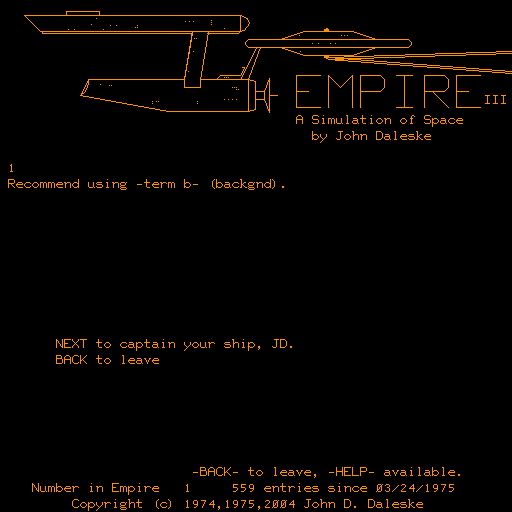
So when did game designers first try to make games that were playable on a network? Well, the first several examples of actual multiplayer games actually pre-dated the Internet. It all began with a game called ‘Empire’, which was created in 1973 by a guy named John Daleske while he was a student at Iowa State University.

Anyway, Empire allowed players to compete against one another in a space combat simulator over a network called PLATO. PLATO stands for Programmed Logic for Automatic Teaching Operations. It came about in around 1960 at the University of Illinois, as a system of graphics terminals (think early desktop PCs) supported by about a dozen networked mainframe computers. PLATO has a fascinating history that I don’t want to delve into too deeply right now, but the development of the system formed the basis for some of our most beloved internet features. By 1976, PLATO had support for primitive versions of e-mail, chat rooms, instant messaging, remote screen sharing, and even emoticons. It also provided the basis for multiplayer gaming, starting with Empire, but expanding to many other types of games throughout the 70s and 80s. Empire went through several different iterations, and by the time Empire IV came out in 1977, they had even given players the ability to live chat with one another. Just to give you some idea of the gameplay, players did not have a mouse, and had to enter all commands via typing. The commands involved punching in coordinates for course changes, and firing weapons based on user-entered degree headings. The object of the game was to conquer the galaxy, naturally, and up to 30 players could be in the game at once, engaging in dogfights against one another to try and gain a foothold in the galactic battle.

Now, skipping ahead to the 1990s, you had some major players come on the scene in terms of multiplayer gaming. Arguably the biggest title out of all of these was Doom, which if you’re not familiar is a sci-fi / horror themed first-person shooter that came out in 1993. Some say it is the greatest PC game of all time, but that’s a matter of opinion. Doom was created by my favorite programmer John Carmack (he also was behind Commander Keen, Wolfenstein 3D, and Quake), and the game was immediately notable for its markedly improved 3D graphics and exciting, imaginative gameplay and storyline. Anyway, as it relates to multiplayer gaming, Doom had a competitive online mode that ran over something called the DWANGO network, which was an online gaming platform launched in 1994. It became known right off the bat for its compatibility with Doom, and it served as a service to match up players looking to compete. Since this was before the actual Internet, the way it worked was players would pay a fee and run the DWANGO client software to connect to a DWANGO server by dialing a phone number in Houston, Texas. DWANGO is actually a thriving telecom company in Japan to this day. Despite the (to our standards) primitive interface, DWANGO actually allowed players to chat in a lobby, organize games, and connect to play Doom together, among many other games that soon came to be supported as well.

So aside from Empire and Doom, what represented the next major leap forward in online gaming? Some say Quake, which was another first-person shooter that made online play an integral part of the product, rather than treating it as an add-on as with Doom, but let’s talk about the year 2000 for a second. I would argue that the year 2000 ushered in the real modern epoch of online gaming, with two of the most popular PC titles ever made, ones that rival Doom in terms of legendary reputation amongst gamers. I’m talking of course about Diablo 2 and Counter-Strike. Counter-Strike was actually a third-party mod of the game Half-Life. Even though the only way to play the game was online, it sold well over 4 million copies, along with countless copies that came free with the purchase of Half-Life. As for Diablo 2, it actually claimed a Guiness World Record for the fast selling computer game of all time, selling over a million copies in 2 weeks. Besides the speed at which it flew off the shelves, Diablo 2 was notable because it allowed a player to use their local player in online matches. Based on these two games, it was clear that competitive online multiplayer was here to stay.

So what else happened? Well, big budget titles have continued to come out of course, and as I said at the beginning, it’s hard to imagine any current game or system that does not rely on the internet in some way as part of its core user experience. I sort of ran out of time to talk too much about browser-based gaming, but I thought Steven’s example of playing Quake directly in the browser was very interesting, so I wanted to take a slightly closer look at that. If you go to quakejs.com, you’ll find one brilliant programmer’s project to port Quake 3 directly into JavaScript, using something called ioquake3, which is the engine that allows the programmer to work with, modify, and run the source code of that particular game.

So, the game itself was written in C, which is interesting for a few reasons. C++ would have been the other, possibly more logical choice, but it only came out about a year before Quake 3 came out, so the developers had pretty much already done about half the work on the game before that actually came out. Speaking of the dev team, John Carmack led the way again, and he has stated that Quake 3 was his favorite game he ever worked on.

At any rate, QuakeJS uses a compiler called Emscripten to take that C source code from the game, and compile it directly to JavaScript, which then of course lets you run the game in our fancy modern browsers. Pretty cool right? Since Quake 3 contains several dynamic libraries such as OpenGL for its graphics, Emscripten also contains versions of these libraries translated into pure JavaScript. Emscripten then links these in and relies upon current, powerful HTML5 technology to find the right counterpart. The fact that this one guy (his name is Anthony Pesch) figured out a way to completely port a game like Quake 3 into a browser using JavaScript is pretty impressive, and his write-up of how he did it goes way beyond my actual ability to discuss, but I encourage you to try out the game and check out his blog post to get a sense of how compilers work with JavaScript.

Resources:

“A Massive History of Multiplayer Online Gaming ioquake3 Engine
Emscripten Site
Anthony Pesch’s Blog Post on porting Quake 3
QuakeJS

A Brief Intro to Nmap

Nmap. What is it? Where did it come from? Who wrote it? And why is it so many movies?

I am approaching this as someone who is obviously learning about Nmap (and the concept of scanning in general) for the first time, but as a result I hope this post functions as a completely basic introduction to the tool and the techniques for network scanning that it provides.

Note: For easy installation of Nmap on Mac, go to https://Nmap.org/book/inst-macosx.html and download and run the .dmg file.

WHAT IS NMAP?

Nmap is short for Network Mapper. It is essentially a toolbelt full of functionality that allows you to perform network scans. It was designed with the intent of quickly scanning large networks - picture using Nmap to scan hundreds of thousands of computers connected to the same network - or you can use it to gather information on only a few target computers.

When most programmers hear the term Nmap, they immediately think of a tool for scanning servers and finding which ports are open, and subsequently attacking them. But Nmap can be used for good just as effectively as it can be used for evil.

Nmap is able to fulfill a variety of tasks, including security scans, figure out the services a host is running, “fingerprinting” the operating system and applications on a host, the type of firewall a host is using, or do an inventory of a local network. As I mentioned, it is one of the best ways for malicious hackers to determine what ports are open on a system, but it also works great for ethical hacking, in terms of discovering ‘unlocked doors’ or security flaws on a network and finding ways to properly address those vulnerabilities. Different tasks require different permissions, and I’ve read about Nmap being likened to a box of dynamite - it’s incredibly powerful, but if you don’t know what you’re doing you can blow your foot off.

You can’t run around scannin' everything you dang please! Security professionals will not appreciate your unauthorized probings of their networks. However, if you have permission, and you know what you’re doing, Nmap has the ability to scan huge networks the serve hundreds of thousands of computers, or you can scan your family’s computers when you’re connected to your WiFi network at home.

Nmap works by sending specially crafted data packets to ports, and analyzing the responses from ones that are open. The metaphor I came across most frequently is that it’s like sending out mass mailers to customers. You place a brochure in every mailbox in the neighborhood, and most people ignore it (closed ports). However, a few people reply to the brochure, and you can then analyze their responses and pay special attention to those, and just forget about the people who ignored your attempts to reach out.

Who invented it?

This is Gordon Lyon, the inventor of Nmap. He’s pretty smart. He often operates online under the alias of Fyodor Vaskovich, in honor of Dostoevsky, and he’s incredibly active in the ethical hacking community even to this day. He released Nmap (open source of course) in 1997, and has spent the past couple of decades developing it and other security-related projects. He even wrote a thriller novel with highly accurate depictions of hacking, and appeared in a comic book where he saves a kidnapped Nmap developer from a criminal organization that was intent on forcing him to hack for evil.

Lastly, one of the coolest things about Nmap is the number of movies it has appeared in. As Steven mentioned when he gave us a brief intro to Nmap, at some point Hollywood and other film industries decided Nmap was the most hacker-like thing they could put on screen to give the movie that touch of realism, and they’re not wrong.

Possibly the most famous example comes from the Matrix Reloaded, where Trinity uses Nmap to find a vulnerable SSH server to hack the city power grid and help Neo out. She even uses a realworld loophole to exploit the server.

You can check out the other movies it has appeared in here, and generally learn more about Nmap on its official site, www.nmap.org.

My Heart: Has Many Loves; Belongs to Ruby

For my blog I decided to write a little about the has many / belongs to relationships between classes. I decided to explore this concept in the context of a side project that I’ve been tinkering with. I’m trying to build an app that should ultimately predict the outcome of NHL games, based on a variety of factors. This should include such factors as who the starting goalies will be, how the teams have performed against each other historically, whether the opposing team has a player who repeatedly scores against the specific opposing goalie, and so on. The app is called the Hockey Oracle and it is definitely going to take the fantasy sports market by storm.

At its most basic level, an individual player belongs to a team. We give the player a team attr_accessor, and then subsequently set that team attribute to an instance of the Team class. On the other end, a team has many players. We enact this relationship by giving teams a goalies or players property upon initialization that is set to an array of goalie or player instances. We add goalies and players to their respective arrays by defining an instance method within the team class called #add_goalie or #add_player.

Anyhoo, I decided to start by setting up three basic classes: Goalie, Skater, and Team. Goalies and Skaters (aka simply Players) belong to a team, while each instance of the Team class ‘has many’ goalies and skaters. I also created a parent class, Player, which I will use for common methods that goalies and skaters can both inherit.

So let’s first take a look at our Goalie class:

1
2
3
4
5
6
7
8
9
10
11
12
13
14
15
16
17
18
19
20
21
class Goalie < Player
  attr_accessor :name, :team, :reflexes, :athleticism, :puck_control

  # these parameters might be good representing a hash with more specific attributes as keys and a number rating as values
  def initialize(name, team=nil, **args)
      @name = name
      @team = team

      args.each do |property, value|
          self.public_send("#{property}=", value)
      end

      if team
          team.add_goalie(self)
      end
  end

  def team_name
      self.team.name
  end
end

I’m doing some fun Steven-inspired meta-programming in my initialize method, which lets me take in a hash of the goalie’s attributes and corresponding ratings as args. Each attribute gets set to an integer corresponding to their actual perceived skill in that area based on scouting reports. I stole the attribute designations from NHL 16. But I digress.

The first two arguments are more important for our discussion right now: name, which is required, and team, which is optional and will be nil if you don’t feel like setting it right away, or the goalie is a free agent or something like that. But let’s focus on team. Assuming the goalie has a team, which would be an already-created instance of the Team class, and also assuming you pass it in as an argument instead of letting it remain as nil.

So how do we get a goalie associated with a team? Well, first we had to make sure our Team class was set up. This meant giving team objects their own proper initialize method:

1
2
3
4
5
6
7
8
9
10
11
12
13
14
15
16
17
18
19
20
21
22
23
24
25
26
27
28
29
30
31
32
33
34
35
class Team
  attr_accessor :name

  @@roster_count = 0

  def initialize(name)
      @name = name
      @skaters = []
      @goalies = []
  end

  def add_goalie(goalie)
      @goalies << goalie
      goalie.team = self
      @@roster_count += 1
  end
  
  def add_skater(skater)
      @skaters << skater
      skater.team = self
      @@roster_count += 1
  end

  def goalies
      @goalies.map do |goalie|
          goalie.name
      end
  end

  def skaters
      @skaters.map do |skater|
          skater.name
      end
  end
end

I set up a class variable, @@roster_count, so we can keep track of the total number of players on a given team, which will come in handy later. Then in my initialize method for Team, I added empty arrays for skaters and goalies. The next thing is, how do we get a goalie to be on a certain team, and enact that relationship? Let’s write an #add_goalie method that takes in an argument of an already-created instance of goalie.

1
2
3
4
5
def add_goalie(goalie)
  @goalies << goalie
  goalie.team = self
  @@roster_count += 1
end

Once we get that down, we can create team objects. Say we want to make the New York Rangers.

1
rangers = Team.new("New York Rangers")

Now, let’s create our new goalie. Superstar Henrik Lundqvist, of course. I’m not going to worry about his specific attributes like reflexes and puck control right now, since I just want to focus on bringing him into existence as an instance of the Goalie class, and adding him to the Rangers.

1
lundqvist = Goalie.new("Henrik Lundqvist", rangers)

Nice, we passed in our team object, rangers, as the argument for Lundqvist’s team. Now ‘lundqvist’ belongs to one team, and that team can have many goalies.

The reason this works is because we are actually calling the #add_goalie method on the team argument at the moment that we initialize a new goalie. That method gets called on team, the goalie is shoveled into the team’s goalies array, goalie.team is set to self (since self is the team in the context of that instance method), and we also make sure to increment the @@roster_count by one. The methods for adding a skater looks exactly the same, except for different naming of variables, and we run the #add_skater method in the initialize for that class as well.

In this way, I’ve set up the preliminary relationship of my hockey prediction app, where teams have many skaters and goalies, and are able to keep track of them and add new ones with a simple adding method, and goalies and skaters belong to a specific team, which can be set based on the code in the two initialize methods for those two classes when each object gets created, assuming you pass in a instance of team as one of the arguments (but you don’t have to, since it’s easy to set it later).

There are a ton of other aspects to this complex interplay between related classes, but I think this gives an overview of how the relationship gets established at the most basic level, and in the context of my own app that I’m working on. I am looking forward to expanding on this as I work to build out my software, and explore the multitude of ways that related classes can reference each other and work together.

Thank you for listening!